Windows)
No. iCorrect 4.0 is a legacy product. CorrectPhoto, The Easy to Use Photo Editor Companion to Windows XP, includes the iCorrect color correction technology. CorrectPhoto includes all of the photo editing and color correction needed to create great pictures. It may be purchased at the PictoColor Product Store at www.pictocolor.com.
Not from iCorrect 4.0. To be eligible for the iCorrect EditLab Pro standalone application upgrade, you must have previously purchased the iCorrect EditLab standalone appliction.
In very rare cases, we have found that outdated display card drivers will cause iCorrect to crash. This is especially true if you have an NVIDIA graphics card. The problem will likely be solved by downloading the latest driver for your graphic card. (Updated NVIDIA drivers may be found at http://www.nvidia.com/.)
Your original file was in JPEG format, which is a lossy, compressed format. When a JPEG file is created, there is a trade-off between the file size and the image quality - the smaller the file size, the lower the image quality. Unfortunately, there is no way for any program to know what JPEG settings were used when the image file was created, so if it is saved again as JPEG, different settings may be used the second time, resulting in a change in file size (either larger or smaller).
Other image file formats, such as TIFF and Windows Bitmap, are not compressed, and so there is not any significant change in file size when re-saving.
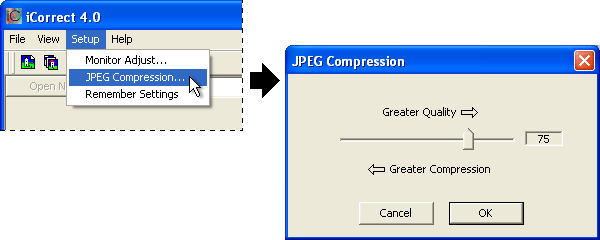
If you have iCorrect version 4.0, you may change the JPEG compression setting by selecting JPEG Compression… from the Setup menu:
Here are some of the main product enhancements:
Yes. iCorrect 4.0 will run on Windows 98, ME, 2000 and XP. However, we strongly recommend Windows XP (Home or Professional) for digital imaging applications.
There is a problem in the iCorrect 4.0 uninstaller for Windows 2000 users. After uninstalling, your thumbnail views in Windows may be gone. The thumbnails may be restored by running Win2000ThumbnailRestore.exe after the uninstaller has completed.
Note: This same problem also exists for any Windows 2000 user who uninstalls Microsoft PhotoEditor (part of the Microsoft Office 97 suite), so the problem is not unique to iCorrect. Our thumbnail restoring utility will also fix thumbnails for Microsoft Office users!
Right click on an image icon and select Properties from the menu. Then click the Change button and select a different application, as shown here: